
Brother Fax-2840 - Toner Replacement
Text Instructions
NOTE: Illustrations shown below are from representative product and may differ from your Brother machine.
- Make sure that the machine is turned on.
- Open the front cover
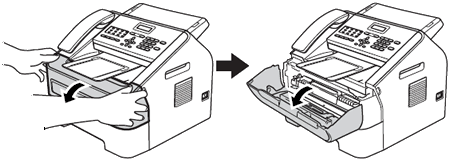
- Take out the drum unit and toner cartridge assembly.
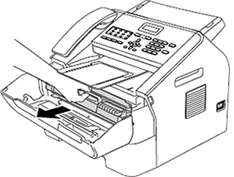
Hold your Brother machine with one hand and hold the drum unit with the other hand. Then, pull the drum unit toward you and lift it up.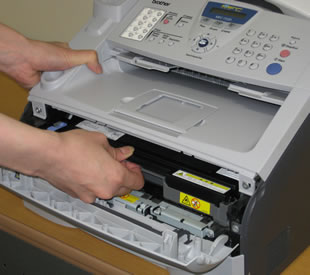
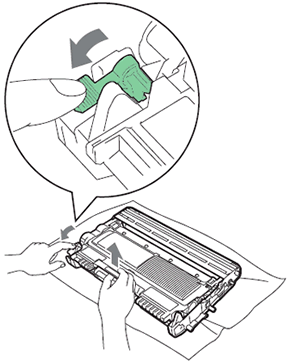
- Push down the green lock lever and take the toner cartridge out of the drum unit.
-
Unpack the new toner cartridge. Hold the cartridge level with both hands and gently shake it from side to side several times to spread the toner evenly inside the cartridge.

-
Pull off the protective cover.

Put the toner cartridge in the drum unit immediately after you have removed the protective cover. To prevent any degradation to the print quality, DO NOT touch the shaded parts shown in the illustrations.
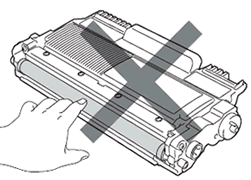
-
Put the new toner cartridge firmly into the drum unit until you hear it lock into place. If you put it in properly, the green lock lever will lift automatically.

Make sure that you put in the toner cartridge properly or it may separate from the drum unit.
-
Clean the primary corona wire inside the drum unit by gently sliding the green tab from left to right and right to left several times.

Be sure to return the tab to the home position (1). If you do not, printed pages may have a vertical stripe.
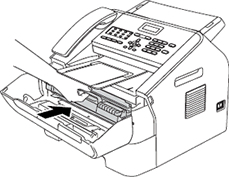
- Put the drum unit and toner cartridge assembly back into the machine. Close the front cover.
No comments to display
No comments to display