
Setup of Microsoft Authenticator Backend
This will assist you if a user is having trouble setting up Microsoft Authenticator.
- In Entra, head to "Users", select the user and select "Authentication Methods".
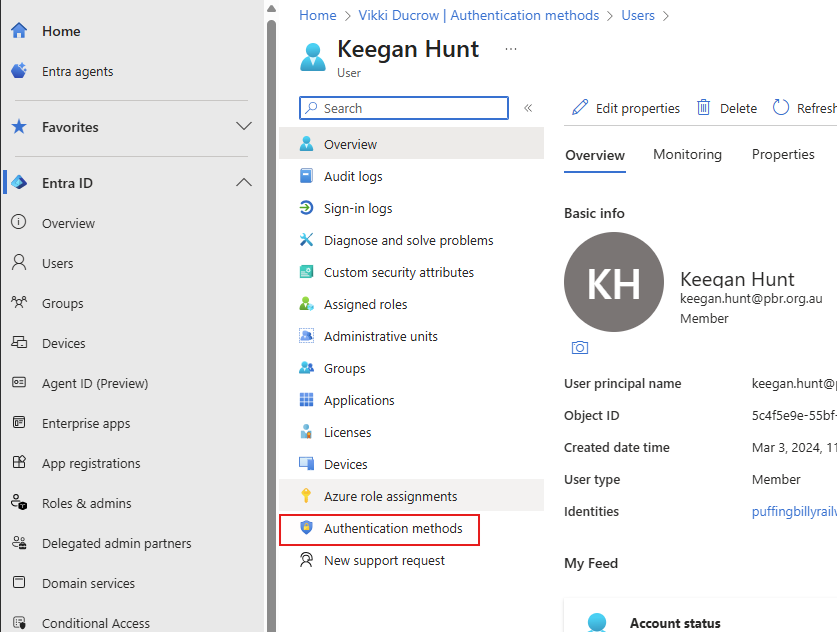
- Delete any authentication methods (NOT DUO, THIS WILL STILL BE USED FOR VPN) so we can start fresh.

- In Active Directory, on the user's profile, remove group SG_DUO_M365MFA and add group SG_M365_MSMFA.
- Perform an Azure sync on PBR-DC-B1. Here is how: Azure AD Connect Sync ... | BookStack
- Now follow article: Microsoft Authenticato... | BookStack
- Once complete, the Entra profile of the user will look like below:
Note: Sometimes users have Microsoft Authenticator (outlook) as the authentication method, this is wrong and was setup by the user previous to the official Microsoft Authenticator changeover.

No comments to display
No comments to display