
Enabling Aztec Code on Datalogic Gryphon Scanners
Aztec Code is disabled by default on the Datalogic Gryphon 2D scanners (GD44XX / GBT4400 / GM440X, including the 4400-BK). If the scanner reads normal QR and 1D barcodes but ignores Aztec codes, enable the symbology using the steps below.
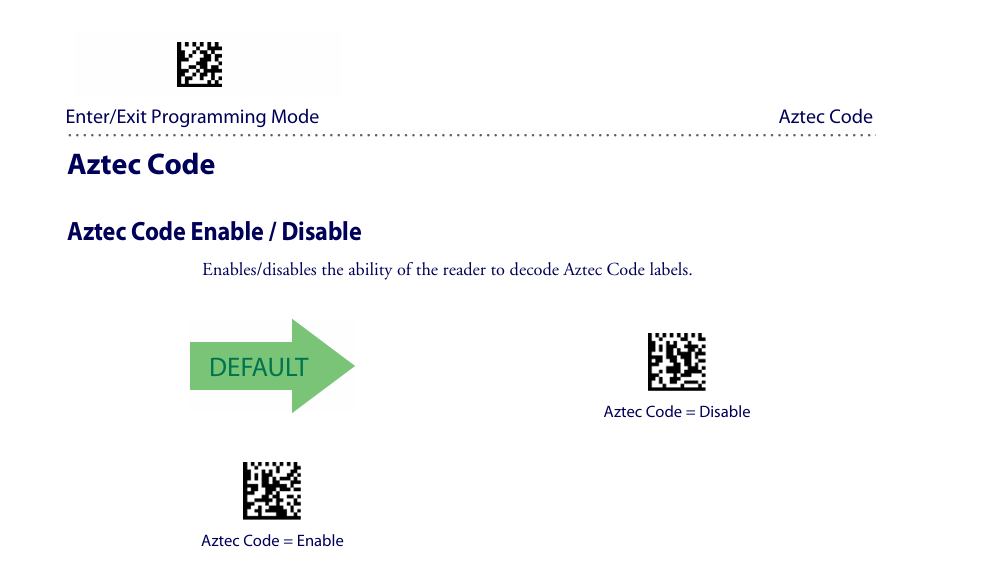
Enable Aztec Code
Scan these barcodes in order:
- Enter/Exit Programming Mode
- Aztec Code = Enable
- Enter/Exit Programming Mode again to save and exit
If Aztec codes shown on a phone or screen still will not read, also enable 2D Normal/Inverse Symbol Control (some screen codes are reverse-video).
Reference: Gryphon I GD44XX / GBT4400 / GM440X 2D Product Reference Guide
No comments to display
No comments to display