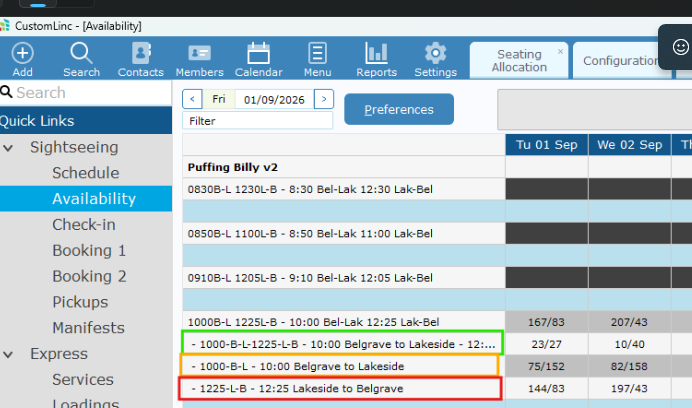
How to: Check Capacity Availability for a Walk-Up Booking
To see correct information on the Availability Screen, please find a guide here:
OR ask for your team or IT to assist.
To being you will need to be familiar with the Product Codes used within CustomLinc.
We have two types of journeys:
-
- Single Journeys e.g. Belgrave to Lakeside OR Lakeside to Belgrave
- Return Journeys e.g. Belgrave to Lakeside to Belgrave
These are our location codes.
-
B = Belgrave
-
M = Menzies
- N = Nobelius Packing Shed
-
L = Lakeside
-
G = Gembrook
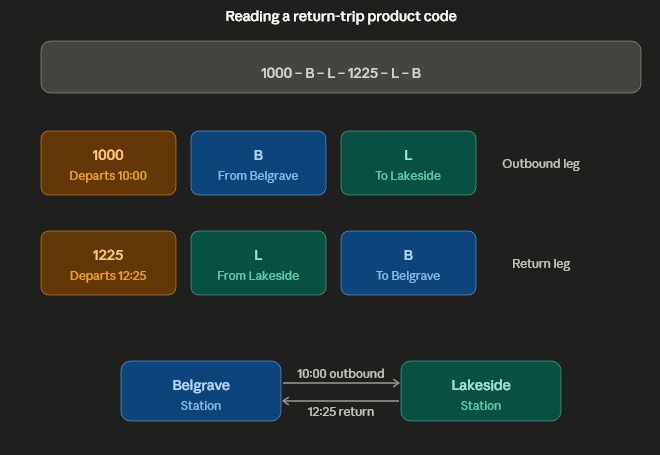
Our Product Codes work as Departure Time - Depart Location - Arrival Location - Departure Time - Depart Location - Arrival Location
For example, a 10AM Belgrave to Lakeside Return is 1000-B-L-1225-L-B
A 10am Belgrave to Lakeside Single is 1000-B-L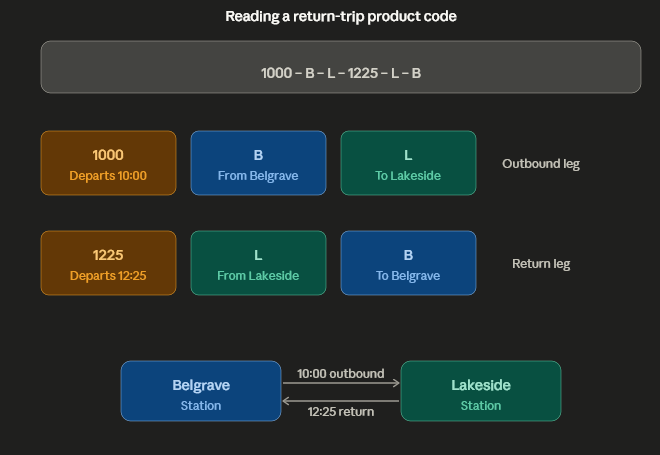
- Select Sightseeing > Availability. It should default to current date, but you can adjust the dates in the top left if needed.
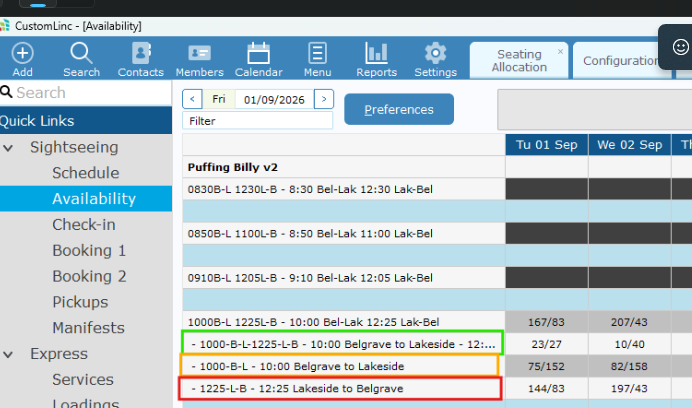
- You want to look for the product you require. We have two types of products:
Our naming works like this 1000-