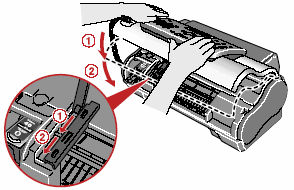
**When Ink is Low** :
When the ink level is low, the Ink Lamp lights up.  **When Ink is Empty :** When the ink is almost empty, **RECOMEND NEW CRT** is displayed on the LCD and the Ink Lamp blinks. When this occurs it may not be possible to clearly print received faxes from memory. When the ink is empty, **NO INK** is displayed on the LCD. Printing will resume as soon as the FINE Cartridge is replaced.
1. Make sure the fax is turned on. 2. Open the Printer Cover until it locks into place securely at the second bump. [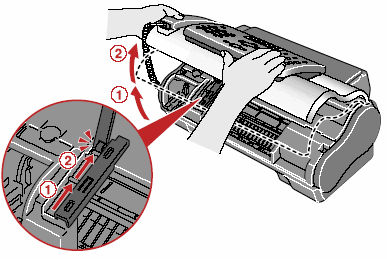](https://bookstack.pbr.org.au/uploads/images/gallery/2026-07/jWoimage.png) 3. Remove the empty Cartridge. - Push down the FINE Cartridge **(1)**. - Remove the FINE Cartridge **(2)**. 4. Unpack a new FINE Cartridge. 5. Remove the protective tape **(A)**. When doing so, DO NOT TOUCH the metallic areas. [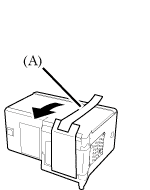](https://bookstack.pbr.org.au/uploads/images/gallery/2026-07/2Lximage.png) [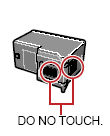](https://bookstack.pbr.org.au/uploads/images/gallery/2026-07/OL7image.png) 4. Insert the FINE Cartridge 1. Insert the FINE Cartridge slightly slanted into the Cartridge Holder. 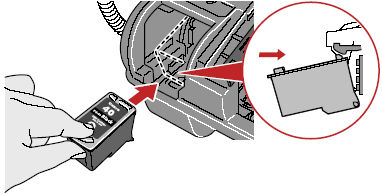 2. Push up the FINE Cartridge until it clicks into place. 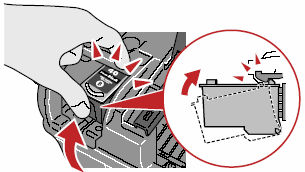 DO NOT put the head of the FINE Cartridge downward into the Cartridge Holder. 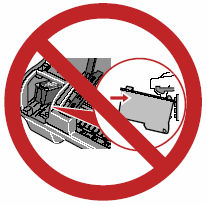 5. Close the Printer Cover.