Level Crossing Monitoring
Node-RED Queue Migration — msg-queue to queue-gate
Overview
| Purpose | Migrate all level crossing Pi Node-RED flows from node-red-contrib-msg-queue to node-red-contrib-queue-gate |
|---|---|
| Trigger | msg-queue fails to install on rebuilt Pis — native sqlite3 dependency does not compile on modern Node.js/ARM |
| Original flow files | E:\Level Crossing Monitoring\Node-red Scripts |
| Migration script | migrate_v2.py (see below) |
| Completed | June 2026 |
Background — Why the Migration
node-red-contrib-msg-queue has not been maintained since 2018. It pins an old version of sqlite3 with no prebuilt binary for current Node.js/ARM combinations. On any rebuilt crossing Pi, installation fails with a node-gyp compile error.
node-red-contrib-queue-gate is the replacement: pure JavaScript (no native dependencies, no compile), actively maintained, and supports persistent queue state via Node-RED's built-in context storage rather than a sqlite file.
Additional finding: the original flows stored the queue at /tmp/queue.sqlite. On the crossing Pis, /tmp is tmpfs (RAM-backed), so the queue was never actually persistent across reboots. The queue-gate migration with a localfilesystem context store improves on the original behaviour.
Flow Architecture — Two Queues, Two Roles
Each crossing flow contains two queue nodes with completely different purposes. Do not confuse them or attempt to replace one with the other.
| Node name | Original type | New type | Role |
|---|---|---|---|
| MQTT Queue | queue (msg-queue) | q-gate (queue-gate) | Store-and-forward MQTT buffer. Holds telemetry while the NB-IoT/IPSec link is down; flushes in order on reconnect. This is the node being replaced. |
| Mains Fail Queue | simple-queue | simple-queue (unchanged) | Alert suppression/debounce. Uses TTL, bypass, and trigger to throttle repeated SMS/alert messages during mains-fail events. Leave this alone. |
Signal Path After Migration
MQTT Status node → [translator function] → q-gate → mqtt out (ThingsBoard)
The translator function is essential — it converts the MQTT node's status event into a gate command. Wiring the status node directly to the gate would cause status objects to be queued as telemetry data.
Critical: The i18n Status Text Bug
Modern Node-RED reports MQTT node status as an internationalisation key, not a plain word:
msg.status.text = "node-red:common.status.connected" // NOT "connected"Any translator function using /^connected/ will never match this string (it starts with node-red:), causing the gate to stay permanently in queueing state even when MQTT is connected.
Use the following corrected function. It matches on both the fill colour and the key suffix, handling both modern and older Node-RED versions:
// MQTT status -> q-gate command
// Node-RED reports status.text as an i18n KEY, e.g.:
//   "node-red:common.status.connected"  (NOT the literal word "connected")
// /^connected/ never matches that string -- use fill colour + key suffix instead.
var s = msg.status || {};
var text = String(s.text || "");
var connected = (s.fill === "green") || /(^|\.)connected$/i.test(text);
msg.topic = "gate-ctrl";
msg.payload = connected ? "open" : "queue";
return msg;
Why this works:
- MQTT connected →
msg.status.fill === "green"— reliable across all Node-RED versions - Key suffix match:
node-red:common.status.connectedends with.connected - Does not match
"disconnected"(the character before "connected" iss, not a dot) or"connecting"(ends ining)
Migration Script — migrate_v2.py
Runs on the Pi directly against ~/.node-red/flows.json. Auto-discovers the queue node and the status node feeding it — no hardcoded node IDs, works across all crossing sites. Creates a timestamped backup before modifying anything.
Important: the translator function inserted by this script still contains the old /^connected/ regex. After running the script, open the MQTT status → gate cmd function node in the Node-RED editor and replace its body with the corrected version above, then deploy.
import json, sys, time, random, shutil, re

CONTROL_TOPIC="gate-ctrl"; STORE_NAME="persistent"; MAX_QUEUE="5000"

def new_id(ex):
    while True:
        i=f"{random.randrange(16**8):08x}.{random.randrange(16**6):06x}"
        if i not in ex: return i

def migrate(path):
    flows=json.load(open(path))
    by={n['id']:n for n in flows if isinstance(n,dict) and 'id' in n}
    queues=[n for n in flows if isinstance(n,dict) and n.get('type')=='queue']
    if len(queues)!=1: sys.exit(f"expected exactly 1 'queue' node, found {len(queues)}")
    q=queues[0]; qid=q['id']
    out=q.get('wires')  # -> mqtt out

    # collision check: any data msg.topic == control topic?
    coll=set()
    for n in flows:
        if not isinstance(n,dict): continue
        if n.get('type')=='function':
            coll|=set(re.findall(r'msg\.topic\s*=\s*["\']([^"\']+)["\']',n.get('func','')))
        if n.get('type')=='change':
            for r in n.get('rules',[]):
                if r.get('p')=='topic' and r.get('t')=='set': coll.add(str(r.get('to')))
    if CONTROL_TOPIC in coll: sys.exit(f"control topic '{CONTROL_TOPIC}' collides with data topic!")

    bak=f"{path}.bak-{time.strftime('%Y%m%d-%H%M%S')}"; shutil.copy2(path,bak)
    z,x,y,name=q.get('z'),q.get('x',0),q.get('y',0),q.get('name','MQTT Queue')

    qgate={"id":qid,"type":"q-gate","z":z,"name":name,"controlTopic":CONTROL_TOPIC,
        "defaultState":"queueing","openCmd":"open","closeCmd":"close","toggleCmd":"toggle",
        "queueCmd":"queue","defaultCmd":"default","triggerCmd":"trigger","flushCmd":"flush",
        "resetCmd":"reset","peekCmd":"peek","dropCmd":"drop","statusCmd":"status",
        "maxQueueLength":MAX_QUEUE,"keepNewest":False,"qToggle":False,
        "persist":True,"storeName":STORE_NAME,"x":x,"y":y,"wires":out}
    flows[flows.index(q)]=qgate

    tid=new_id(by)
    func=('var t=(msg.status&&msg.status.text)?String(msg.status.text):"";\n'
          f'msg.topic="{CONTROL_TOPIC}";\n'
          'msg.payload=/^connected/i.test(t)?"open":"queue";\nreturn msg;\n')
    flows.append({"id":tid,"type":"function","z":z,"name":"MQTT status -> gate cmd",
        "func":func,"outputs":1,"noerr":0,"initialize":"","finalize":"","libs":[],
        "x":x-200,"y":y+60,"wires":[[qid]]})

    # reroute every status node feeding the queue: swap qid -> tid (preserve other targets)
    rerouted=[]
    for n in flows:
        if isinstance(n,dict) and n.get('type')=='status':
            changed=False
            for g in n.get('wires',[]):
                for i,t in enumerate(g):
                    if t==qid: g[i]=tid; changed=True
            if changed: rerouted.append(n['id'])
    json.dump(flows,open(path,'w'),indent=4)
    return bak,qid,tid,out,rerouted

if __name__=="__main__":
    bak,qid,tid,out,rr=migrate(sys.argv[1])
    print(f"backup: {bak}")
    print(f"queue {qid} -> q-gate, output -> {out}")
    print(f"translator {tid} added; status nodes rerouted: {rr}")
Usage
# 1. Stop Node-RED so it does not overwrite the file on next deploy
sudo systemctl stop nodered

# 2. Run the migration (auto-discovers queue/status nodes; backs up automatically)
python3 migrate_v2.py ~/.node-red/flows.json

# 3. After running: open the "MQTT status -> gate cmd" function node in the editor
#    and replace its body with the corrected translator function (see above).

# 4. Install required packages
cd ~/.node-red && npm install node-red-contrib-queue-gate

# 5. Add the persistent context store to settings.js (see below), then start
sudo systemctl start nodered
Required npm Packages
Install before importing the migrated flow. The queue-gate package is required at all sites. Additional packages vary by flow — check the "Imported unrecognised types" warning after import and install accordingly.
cd ~/.node-red
npm install node-red-contrib-queue-gate   # required for all sites
# install additional packages shown in "Imported unrecognised types" on import, e.g.:
npm install node-red-contrib-toggle node-red-contrib-string
sudo systemctl restart nodered| Node type | npm package | Sites known |
|---|---|---|
q-gate | node-red-contrib-queue-gate | All sites |
toggle | node-red-contrib-toggle | Edenmont Road Clematis |
string | node-red-contrib-string | Edenmont Road Clematis |
Persistent Context Store
The q-gate node is configured with persist: true and storeName: "persistent". This requires a named non-volatile context store in ~/.node-red/settings.js. The store key must be persistent to match.
contextStorage: {
    default: { module: "memory" },
    persistent: {
        module: "localfilesystem",
        config: {
            dir: "/home/unipi/.node-red/context",
            flushInterval: 5   // seconds; lower = less data loss on power cut, more SD writes
        }
    }
},
After editing settings.js, restart Node-RED. The q-gate node's Restore from state saved in dropdown should then show persistent as an available store. If the store is absent, the gate falls back to its default state (queueing) on each restart — functional but not persistent across reboots.
SD card wear note: flushInterval: 5 writes the context file every 5 seconds only during active queueing (i.e. during outages). During normal operation with the gate open and queue empty, no writes occur.
Local MySQL Database — crossing_monitor
Each crossing flow logs all signal state changes to a local MariaDB database in parallel with the ThingsBoard telemetry publish. On a rebuilt Pi, MariaDB must be installed and the database provisioned.
Table Schema
Sourced from a working School Road Upend Pi (MariaDB 10.3.22, Debian Buster). The ttime column is type time, not datetime — NOW() inserts are truncated automatically by MariaDB.
CREATE DATABASE IF NOT EXISTS crossing_monitor CHARACTER SET utf8mb4;
USE crossing_monitor;

CREATE TABLE `crossing_data` (
  `tdate`  date DEFAULT NULL,
  `ttime`  time DEFAULT NULL,    -- NOTE: time, not datetime; NOW() is truncated on insert
  `name`   text DEFAULT NULL,
  `value`  text DEFAULT NULL
) ENGINE=InnoDB DEFAULT CHARSET=utf8mb4;
Restoring from Another Site
# On a working Pi:
sudo mysqldump --no-data crossing_monitor

# On the rebuilt Pi -- paste the output into a temp file:
cat > /tmp/schema.sql    # paste, then Ctrl+D
sudo mysql -e "CREATE DATABASE IF NOT EXISTS crossing_monitor CHARACTER SET utf8mb4;"
sudo mysql crossing_monitor < /tmp/schema.sql
Authentication — Anonymous Local User
On a rebuild without the original flows_cred.json, Node-RED connects to the database with an empty username and no password (''@'localhost'). Grant the anonymous local user access rather than re-entering credentials in each node:
# Grant anonymous localhost user access (credentials not available from flows_cred.json)
sudo mysql -e "CREATE USER IF NOT EXISTS ''@'localhost'; \
  GRANT ALL PRIVILEGES ON crossing_monitor.* TO ''@'localhost'; \
  FLUSH PRIVILEGES;"

# Confirm MariaDB is binding to localhost only (not 0.0.0.0)
ss -ltnp | grep 3306
This is acceptable because MariaDB binds to 127.0.0.1 by default (localhost only). If the port is ever exposed on a network interface, remove the anonymous user grant and configure explicit credentials in the MySQLdatabase node instead.
Per-Site Migration Status
| Site | Hostname | Status | Notes |
|---|---|---|---|
| Kilvington Drive (SRDE) | unipi | ✅ Complete | q-gate confirmed open and draining, MySQL provisioned |
| Edenmont Road, Clematis (ECRL) | M303-sn27 | ✅ Complete | toggle + string packages also installed, MySQL provisioned |
| School Road Upend (SRUE) | SRUESchoolroadupend | ⏳ Pending | Used as DB schema source; migration not yet applied |
| All other sites | — | ⏳ Pending | Run migrate_v2.py; check for unrecognised types on import |
Maintenance Notes
- maxQueueLength is set to 5000 in migrated flows. If a site shows ThingsBoard data gaps after a long outage, the queue may have filled — review and increase as needed.
- keepNewest: false — on overflow, the oldest messages are retained and new arrivals dropped, preserving chronological order for ThingsBoard history. Change to
trueif latest-state-only is preferred. - TLS / SCEPman certs — certificate content is stored in
flows_cred.json, not the flow file. On any rebuild, the SCEPman client cert must be re-provisioned and re-entered in thetls-confignode for mTLS to ThingsBoard to function. - migrate_v2.py translator bug — remember to manually paste the corrected function after running the script on each remaining site.
- SD card health — these Pis have experienced SD card failures (confirmed dead card at Kilvington Drive during this rebuild). Monitor card health and consider scheduled replacements.
Teltonika TRB Modem Setup
- Connect Modem to Antennas, add Full Size Active LTE SIM, and Power On.
- Connect Modem to laptop via Ethernet. Set local Eth Adaptor to 192.168.1.0/24 network
- Navigate to Modem on default IP 192.168.1.1 and login with username admin and password printed on bottom of device
- Change Password to the default Teltonika Router password in 1Password
- Ensure that LTE connection comes alive - change DNS settings to use Public resolvers (1.1.1.1 & 8.8.8.8)
- In Teltonika RMS - onboard the Device into the PBR account, using the Serial #, IMEI, and Default Teltonika Password (if changed)
- Download latest stable Firmware Package from Teltonika website TRB246 Firmware Downloads - Teltonika Networks Wiki
- Install locally on the device, reboot.
- Ensure the device successfully activates the Teltonika RMS connection.
- Install the following Packages inside Package Manager - wait for these to install
- DDNS
- MQTT
- SCEP
- SNMP
- Wake on LAN
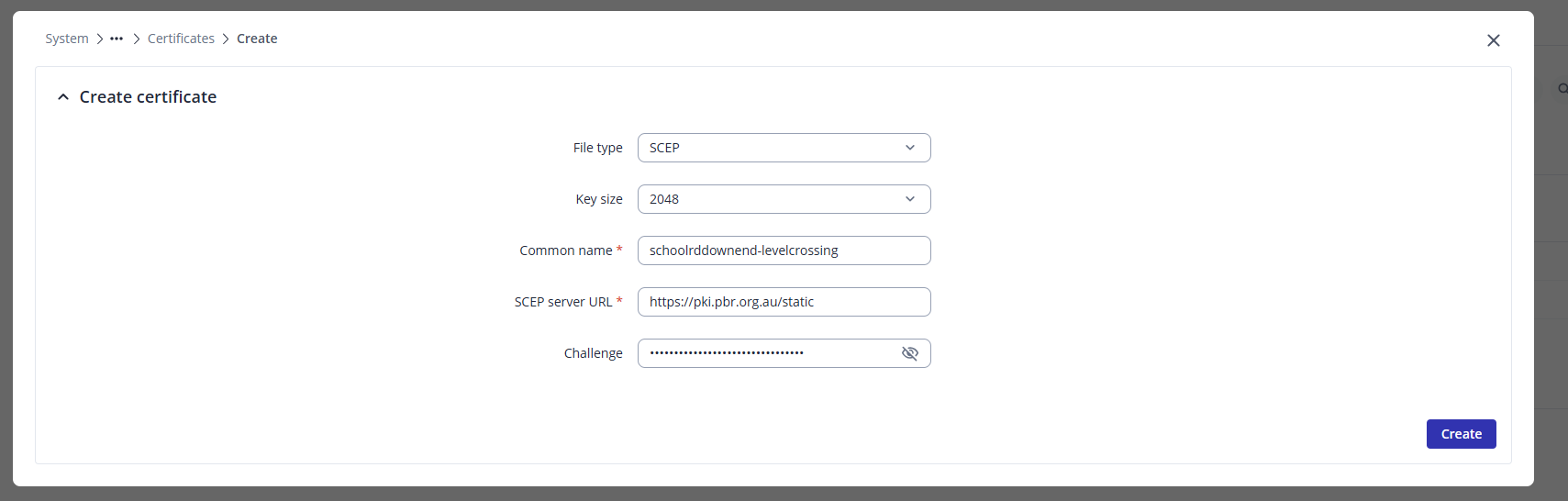
- Create the device certificate from SCEPman in System > Administration > Certificates,
-
- Create the MQTT broker and bridge according to the below settings (or use the Configuration Profile
- MQTT Broker Enabled
- Local Port 1883
- Broker Settings > Miscellaneous > Allow Anonymous On
- Add Bridge
- Connection name: bridge_thingsboard
- Protocol Version: 5.0
- Remote Address: pbr-iot-1.pbr.org.au
- Remote Port: 8883
- Use Remote TLS/SSL: On
- Certificate Files from Device: On
- Bridge CA File: ca-certificates.crt
- Bridge Certificate File: <CERT YOU CREATED>
- Bridge Key File: <KEY YOU CREATED>
- Topics Configuration
- Topic Name: v1/devices/me/telemetry
- Direction: OUT
- QOS Level: At Least Once (1)
- Create the Dynamic DNS Entry under Services > Dynamic DNS
- Make sure the DDNS entry already exists inside of https://freedns.afraid.org/subdomain/
- Edit the default myddns config
- Enabled: On
- Use HTTP Secure: On
- Lookup Hostname: <CROSSING>.levelcrossing.ddns.pbr.org.au
- DDNS Provider: afraid.org-v2-basic
- Domain: <CROSSING>.levelcrossing.ddns.pbr.org.au
- DNS Server: 8.8.8.8
- Username: <creds in 1Password>
- Password: <creds in 1Password>
- IP address source: Public
- URL to detect: http://checkip.dyndns.com
- Enable GPS
Ensure you test the MQTT config is accurately reporting into Thingsboard. You can do this by using a local Mosquitto MQTT relay.
You will need to add the device into Thingsboard, This can be done using x.509 authentication and downloading a local copy of the certificate generated by the Teltonika Router.
This is the rough configuration all sorted. Make sure that the Timezone and Hostname are properly set up on the device.
Once deployed out, you will need to change the NodeRed config to send the MQTT messages to the Teltonika rather than Thingsboard - and alter the device config of the existing Level Crossing device to use the new X.509 certificate, rather than the Access Token.
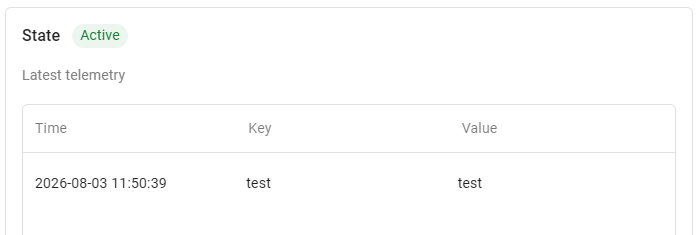
C:\Program Files\Mosquitto>mosquitto_pub.exe -h 192.168.1.1 -t v1/devices/me/telemetry -m {test:test}