# Adjusting the Train Capacity (Manifest)
## Overview
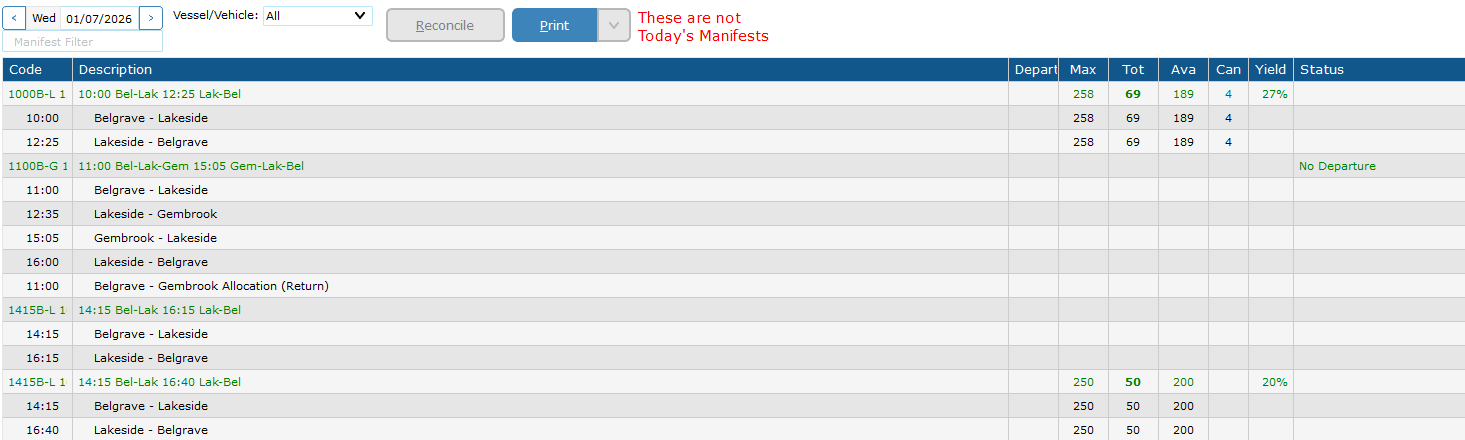
Use this procedure to change the capacity for general and single-journey passengers. This affects the four main legs: Belgrave–Lakeside, Lakeside–Gembrook, Gembrook–Lakeside, and Lakeside–Belgrave.
[](https://bookstack.pbr.org.au/uploads/images/gallery/2026-05/moKimage.png)
**Do not manually edit these individual legs** — changing the manifest will update them automatically.
## Steps
1. In CustomLinc, navigate to **Sightseeing > Manifests**.
2. Locate the relevant service. The manifest is the **green highlighted row** showing the full journey. Individual legs appear indented beneath it.
3. **Right-click** on the green manifest row.
4. Hover over **Stop Sell / Max Pax…** and select **This Manifest**.
5. In the dialog:
- Set the **From** and **To** dates for the change, or use *Select Recurring Days…* to target specific days of the week.
- Tick **Set max Pax to…** and enter the new capacity in the field to the right.
6. Click **Finish**.
7. Verify the change by reviewing the four leg rows beneath the manifest — their capacity figures should now reflect the updated value.
## Important Notes
- Always right-click on the **green manifest row**, not an individual leg. Right-clicking a leg will only modify that single leg & will stop that leg getting updated max capacities via the manifest.
---
## Belgrave – Gembrook Return Management
Adjusting the Belgrave–Gembrook Return allocation is a separate procedure. See [Adjusting the Belgrave–Gembrook Return Allocation](https://bookstack.pbr.org.au/books/capacity-management/page/adjusting-the-belgrave-gembrook-return-allocation).